The C64 Mini Has Arrived, Can You Relive Commodore’s Glory Days?


The C64 Mini Has Arrived, Can You Relive Commodore’s Glory Days?


October 9 marks the US release of the c64 Mini. It features high-definition video output and sound via HDMI, a collection of games built in (plus the ability to load your own), a joystick, USB ports for keyboards, and even C64 BASIC.

LOAD “*”,8,1

It finally happened! The Commodore 64 is back in stores!
Okay, maybe it’s not precisely the Commodore 64. This one is a bit different. Maybe it’s the color? The USB ports? I just can’t put my finger on what’s changed…
TheC64 Mini and Breadbin Commodore 64. Thank you to Chris Whillock for the picture.
The C64 Mini and a vintage 80s Commodore 64
On October 9, Retro Games Ltd is officially releasing the C64 Mini to US customers, and Americans will be able to get in on the half-size retro gaming action previously reserved for the NES Mini, SNES Mini, and the Atari Flashback.
While the Mini has been on the European market for a few months, October marks its entry into the North American market. (Curse you, PAL, and your incompatible TVs!)

100 INPUT “What’s In The Box?”, A$

The C64 Mini is a recreation of the classic Commodore 64 computer. The tiny ARM-based computer perfectly recreates the original Commodore 64 software environment. Like the original C64, the Mini plugs into your TV set. This time, though, instead of using a coaxial cable and tuning to channel 3, you get an HDMI cable and high definition pixels. Don’t worry, though: the Mini includes scan line emulation so that you can get that retro CRT experience, even on a modern 4K TV.
You can select from the 64 included games using a custom launcher called the Carousel. Each game also has four save slots, allowing you to freeze the game and pick up right where you left off. The included games cover a cross-section of popular 8-bit games, and if your favorite game isn’t there, you can add your own with the built-in USB ports. If you can download it from one of those retro gaming sites, chances are it will work on this machine.
C64 BASIC welcome screen
BASIC, Represent!
Retro Games didn’t forget BASIC users, either. The C64 Mini includes the original Commodore BASIC programming environment. BASIC programs run on the Mini exactly as they did on the original Commodore 64, and if you still have some of those old Compute’s Gazette magazines lying around, you can type in those programs and make them run! You will need a USB keyboard, though. The keyboard on the actual Mini is just a prop; it looks good but doesn’t work.
The included games might also be different than what you’d find on the versions sold in other countries due to different license and distribution agreements Retro Games was able to make with the people who own those properties. Regardless, since you can install whatever games you want, this really shouldn’t be an issue.

200 PRINT “Who’s It For?”

The Carousel in action
The Mini is meant for anyone who loves classic 80s video games. Some of the greatest games of all time are represented (as are, honestly, some very mediocre titles.) Of course, as I mentioned earlier, you can also load your own programs, so you can grab a game from any of the websites out there that have downloadable .D64 files, plug it in, and play.
Kids can also play some of the games their parents (or even grandparents) grew up on. My kid loves some Jumpman, and we’ve been known to sit down to a friendly game of Wheel of Fortune (that’s one you’ll need to find out there on the web.) What’s more fun than watching TV game shows at 7:00 every weeknight? Playing your own game show on your TV.

500 INPUT “Do I Want One?”, A$

The Mini is a fun trip down retro lane. I tested one for a few days, and while it recaptured some of the feel of the 1983 classic, it also has some drawbacks. The “keyboard” on the unit is just a chunk of molded plastic that doesn’t work, and there’s no place to plug in a cartridge, the old 9-pin joysticks, or a real disk drive. There is also no network connectivity of any kind. (The lack of an online app store feels like a missed opportunity.)
TheC64 Mini retail boxThe USB ports do let you load games. Retro Games has done that better than any of the other retro consoles. I don’t need to crack the system to run downloaded games; I just need a $5 USB stick and a downloaded file. While the current software is a little limited, Retro Games promises a new firmware release before the ship date, giving users more freedom to mount disk images and customize the carousel.
I also have some concerns about the joystick; it’s a little bit stiff, and several people in the Facebook group have reported accidentally breaking theirs. One of the best things you can do for yourself is to order a set of USB gamepads (any of the SNES style USB pads with eight buttons seem to work just fine) if you find yourself spending a lot of time on the Mini. You’ll also want a USB keyboard. Any USB keyboard should work.
Finally, if you’re comfortable with installing emulators, you might find that an emulator on the PC will do everything you want. The software inside the Mini is a customized Linux distribution with a customized build of VICE living on top of it. So there’s nothing in the Mini that you can’t get with a Windows, Mac, or Linux computer running Vice (or maybe Commodore 64 Forever, if you want a nice game launcher.) There are even retro emulator packages for the Raspberry Pi, such as Combian or RetroPie, that can handle c64 games.

RUN : To the store

Still, even though it’s not perfect, I want one. I can’t wait to plug it into the living room TV and, once again, take over the television while everyone else wants to watch Magnum PI.
Image Credit: thec64.com
Share:

The LG Watch W7 is a smartwatch with classic mechanical hands


The LG Watch W7 is a smartwatch with classic mechanical hands


The LG Watch W7.


Does a smartwatch have to be a timepiece without mechanical hands?

LG is addressing this notion head-on with the hybrid Watch W7 (just announced alongside the V40 ThinQ). Yes, it does have a screen, but there are also a pair of hands that stick out to tell time classically.
The LG Watch W7 launch on Oct. 14 for $449. Pre-orders start Oct. 7, exclusively at BestBuyin the U.S.
The Watch W7 runs Google's Wear OS. An LCD panel, minute and hour hands, and then a layer of glass make up the face. Holding all of that together is a stainless steel frame that comes in cloud silver. It has a round 1.2-inch LCD 360 x 360 display with a hole in the center so the two hands can pass through.

IMAGE: LG
Those analog hands are an issue, however: at any moment, they could be blocking something on the screen.
LG and Google worked together to solve this problem. Wear OS can automatically and intelligently move the watch hands to either midnight or to 9 and 3 (so they createa a flat line) so they don't interfere with the display as much. You can also manually move the hands via the main crown on the side.
It's not the most elegant solution, but remember this is a 1.0 device. LG may figure out better solutions in future versions.
On top of working with Google, LG tapped Soprod SA — a Swiss company — for help with the mechanical hands and gearbox. With the inclusion of a gearbox, LG had to make room for it inside. As a result, this is not the most feature-filled smartwatch with no heart rate sensor or cellular connectivity. (The Apple Watch Series 4 and Samsung Galaxy Watch have both.)
The Watch W7 has WiFi and Bluetooth onboard. It will need a direct connection with a smartphone that supports Wear OS for it to fully work. Water and dust resistance means you can bring the W7 with you on various adventures. There are a bunch of other sensors on the inside, including an accelerometer, barometer, altimeter, and gyroscope.

IMAGE: LG
In plain "watch" mode, the W7 becomes a purely classic timepiece. In this mode it has multi-day battery life, which sounds like a plus... until you remember that watches that only tell time have been around for decades, and they tend to have batteries that last months if not years. Acting as a smartwatch, the Watch W7 is rated for two days of battery life.
Oddly enough, powering the Watch W7 is last year's Qualcomm Snapdragon 2100 chip (APQ8009w, specifically), not the recently announced and more efficient 3100 platform.
For now, interested consumers who want the look for a classic watch with smart features finally have an answer with the LG Watch W7. Just know what you're settling for: a watch that lacks some sensors, packs last year's processor, doesn't have LTE support, and is relatively expensive.
Share:

New Google Chromecast shows up in yet another leak before Pixel event


New Google Chromecast shows up in yet another leak before Pixel event


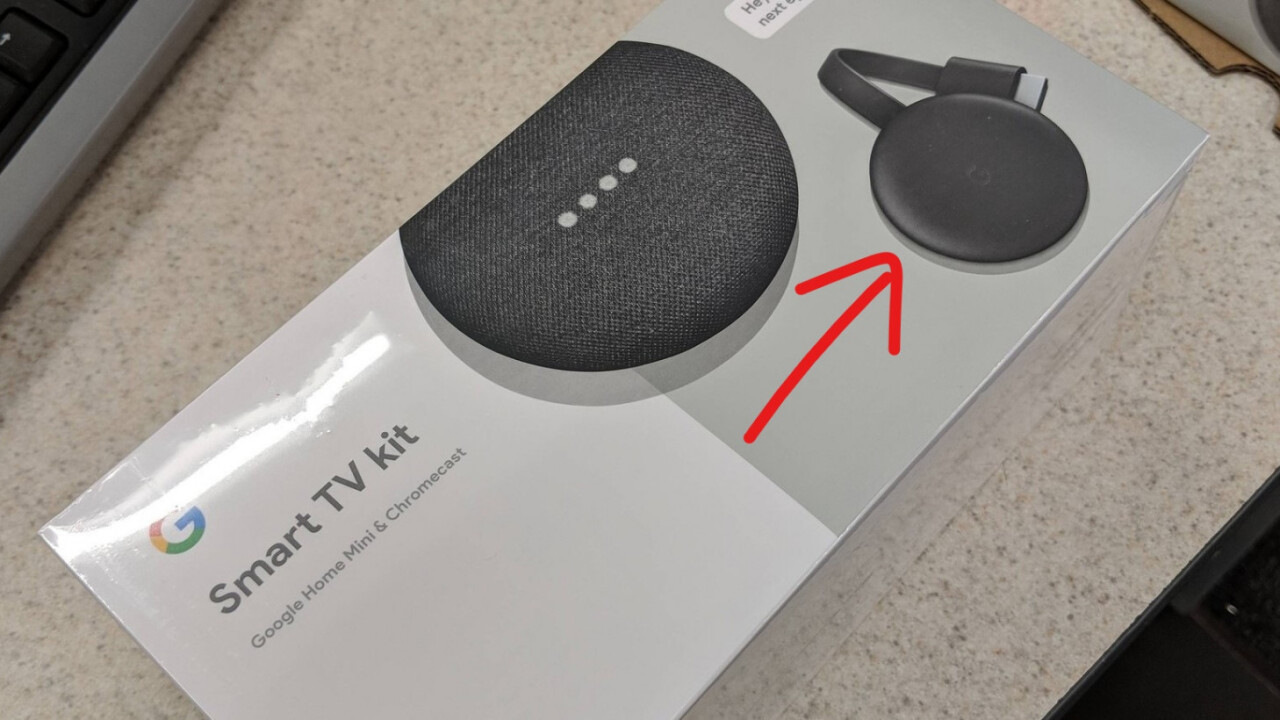
It’s not just the Pixel 3 that keeps leaking before Google’s event next week –  we already have an idea of other devices that may launch, including a smart display and new Chromebooks. Now we’re getting a good look at one more expected device, Google’s third-generation Chromecast, thanks to yet another leak.
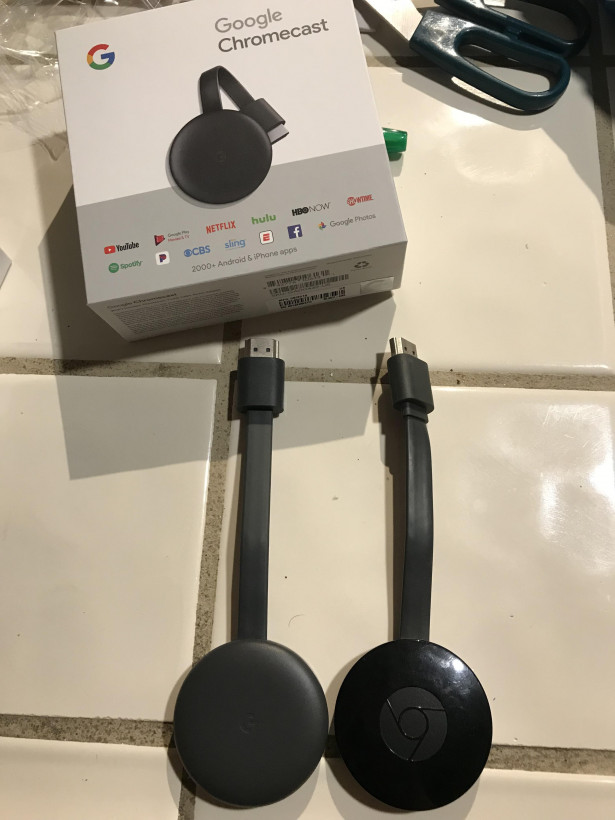
As spotted by The Verge, a now-deleted Reddit post showed off a new ‘Smart TV’ kit, complete with a Google Home Mini and the new Chromecast in tow. This happened a week after Best Buy managed to accidentally sell the new Chromecast to a customer as well. Woops.
Unfortunately, the leak doesn’t provide much in the way of new details. There’s no mention of 4K or HDR n the packaging, which makes us think this will just be a basic refresh of the original, HD-only chromecast. You’ll still have to fork up some cash for the extra resolution, it seems. But presumably Google wouldn’t refresh the device without some sort of a change, so at least we know Google will have something left to show off next week.
Share:

Windows 10’s October 2018 Update is Out Now: The Best Features and How to Get It


Windows 10’s October 2018 Update is Out Now: The Best Features and How to Get It


Microsoft released Windows 10’s October 2018 Update on October 2, 2018. Your PC may not automatically install this update for a few weeks, but you can download it now to get the latest features immediately.

The Best Features in Windows 10’s October 2018 Update

Windows 10’s October 2018 Update was codenamed Redstone 5 during the Insider Previewdevelopment process, and is also known as Windows 10 version 1809. It focuses on features you might actually use. There’s no new Paint 3D-style app here.
This latest Windows 10 update includes a Your Phone app that lets you text from your PC and instantly access photos from your phone on your PC, assuming you’re using an Android phone. Fewer features are available to iPhone users, but the “Continue on PC” feature will let you quickly send links from an Android phone or iPhone to your PC. Notification syncing from Android phones to PCs is coming soon, too.
Microsoft has also added a new clipboard history feature you can access by pressing Windows+V. This clipboard history can sync between all your PCs, and will one day sync to the SwiftKey keyboard on your phone for easy copy-pasting.
Unfortunately, the “Sets” feature that added tabs to every application on your system was removed from the final update and has been delayed. It might appear in Windows 10’s next update.
File Explorer now includes a dark theme, the touch keyboard is now “powered by SwiftKey,” and the new Snip & Sketch tool makes it easier to capture and annotate screenshots.
Under the hood, you’ll find easier HDR setup and mobile broadband improvements, power usage details for processes in the Task Manager, a quick slider to make all the text bigger on your screen, and better controls while projecting your screen wirelessly.
Microsoft has even made a lot of improvements to Notepad, which can now handle UNIX-style line endings. Geeks will appreciate new keyboard shortcuts for copy and paste in the Windows Subsystem for Linux, and the ability to quickly launch a Linux shell directly from File Explorer.
Those are just a few of the many, many improvements and changes you’ll find in this update. Check out our in-depth look at everything new in Windows 10’s October 2018 Update for more details.

How to Get Windows 10’s October 2018 Update Now

To get the update, just head to Settings > Update & Security > Windows Update on your PC. Click the “Check for Updates” button here.
Here’s how this works: Microsoft slowly rolls these updates out, and Windows 10 normally waits at least a few weeks before installing them. But, if you click this button, Windows 10 knows that you want the update right now, and your PC will find and install it.
This update may not be available to everyone immediately, so check back later today if it doesn’t download after you click the button.
If this doesn’t work, you can also download and run Microsoft’s Windows 10 update assistant. Visit the Download Windows 10 page and click the “Update Now” button to download the assistant. Run it after downloading it and it will upgrade your Windows system to the latest available update.
If you experience a problem after updating, you can go back to your previous version of Windows 10. This option is only available for the first ten days after updating, after which Windows will automatically delete the old files to free up space.


Share:

Facebook advertisers can target you with data you didn’t even list on your profile


Facebook advertisers can target you with data you didn’t even list on your profile


Facebook advertisers can target you with data you didn̢۪t even list on your profile


Facebook is sharing personally identifying information that you never submitted to the social network with its advertisers – and you can’t erase it from their records.
That’s from a paper (PDF) published by researchers at Northeastern University and Princeton University, who looked into how ad targeting works on Facebook.
Say you’ve got a mobile phone number and a landline, and you’ve listed only the former in your profile. If an advertiser has that number in their database, they can use it to target you with ads on Facebook. But if the advertiser has the landline number, they could target you with that as well.
How’s that possible, when you haven’t shared the landline number with Facebook? Well, you may not have given it to Facebook, but if you gave the number to a friend who’s also on the social network and has it saved in their address book (which Facebook has access to), then it can be associated with your profile.
As Gizmodo noted in its piece, Facebook has previously denied doing this. What’s more, if you give the site a mobile number solely for two-factor authentication, that can also be targeted by advertisers who have it listed in their database.
This isn’t the biggest infraction Facebook is guilty of, but it proves once again that the company doesn’t care about your privacy.
Here’s more damning context: WhatsApp co-founder Brian Acton – who sold the service to Facebook and resigned from the company last year – said that the company had plans to go against his vision and monetize the messaging service through advertising, even before the acquisition.
Facebook exec David Marcus, who formerly led Messenger and is now in charge of blockchain-based initiatives at the company, responded with a post in which he labeled Acton’s statements “a whole new standard of low-class.
Marcus added:
… Facebook is truly the only company that’s singularly about people. Not about selling devices. Not about delivering goods with less friction. Not about entertaining you. Not about helping you find information. Just about people.
I’ll leave it to analyst Ben Thompson to expertly sum up why Marcus is on the wrong side of this fight (captured in brief in the tweet below):
Gizmodo’s enlightening piece is worth a read; you may now delete your Facebook account.
Read next: Amazon Prime Reading brings a half-decent selection of free ebooks to India
Share:

Snoop around the garage Google was founded in with Street View


Snoop around the garage Google was founded in with Street View


Google's original garage is explorable on Street View, complete with CRT monitors.


To celebrate Google's 20th birthday, the tech giant is opening up the garage it was founded in, plus a bunch of other fun things.

The Google garage, as it was in 1998, is now explorable on Street View, complete with many CRT monitors, cables galore, and a washer and dryer that Google co-founders Larry Page and Sergey Brin gleefully used as part of their rent.
Page and Brin spent the winter of 1998 working out of Susan Wojcicki's garage, the YouTube CEO who back then was fresh out of school and was afraid of missing her mortgage payments.
The house on Santa Margarita Avenue in Menlo Park is now owned by the tech giant and no one lives there. 
If you can't get there, you can take a stroll inside "Google Worldwide Headquarters," which features a ping pong table, and a keyboard for music breaks.
Google has also unveiled easter eggs that will show up in search. 
When you look up certain (outdated) search terms like "mp3 file," "watch a dvd," "gettin' jiggy wit it," "page me," or "butterfly clip styles," you'll be recommended with things that are more relevant in 2018.
As announced earlier this week, Google Images has also launched a redesign on desktop, which features a new ranking algorithm that will prioritize content that is fresher and can be found on pages where the image is important, like a product page, for instance.
Share: